




An actual SEO investigation involving Google Search Console, Cloudflare crawler logs, WordPress, and a few assumptions that didn’t survive testing.
I spent hours trying to understand why two articles on BluFashion.com weren’t appearing in Google’s index.
Not because the pages were blocked. Not because they returned errors. Not because they were missing from my sitemap. Both were accessible, and Google’s own live inspection tool said they could be indexed.
Yet one hadn’t received a recorded indexing crawl in months. The other hadn’t received one at all.
Meanwhile, other older articles I revised were getting indexed, sometimes quite quickly.
I wanted to know what made these two different.
What followed was a hands-on investigation through Google Search Console, Cloudflare request logs, WordPress exports, and Chrome Developer Tools. We found some genuine technical issues. We ruled out several others. And we learned why a green checkmark in Google’s live test isn’t nearly as reassuring as it looks.
The short answer: I still can’t prove exactly why Google hasn’t indexed these pages. But I can show what we tested, what the evidence revealed, and which SEO fixes weren’t worth making.
The Two Articles That Started Everything
The first problem was my guide to partial vs. full highlights.
I’d revised the content, checked its technical settings, and submitted it for indexing. Google still showed:
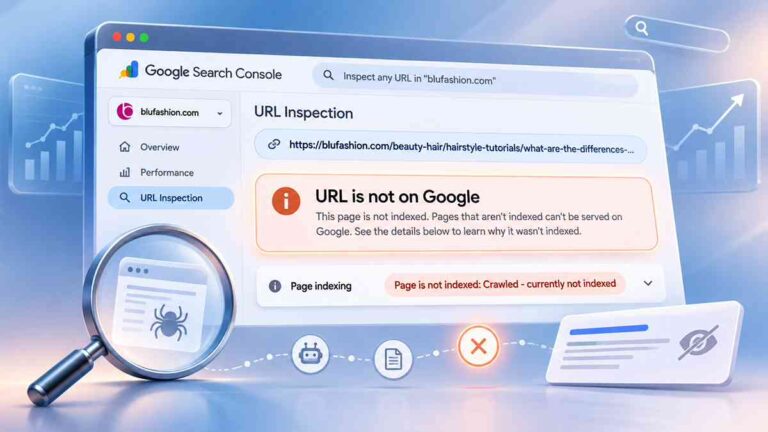
Crawled, currently not indexed.
Its last recorded crawl was July 3, 2026.
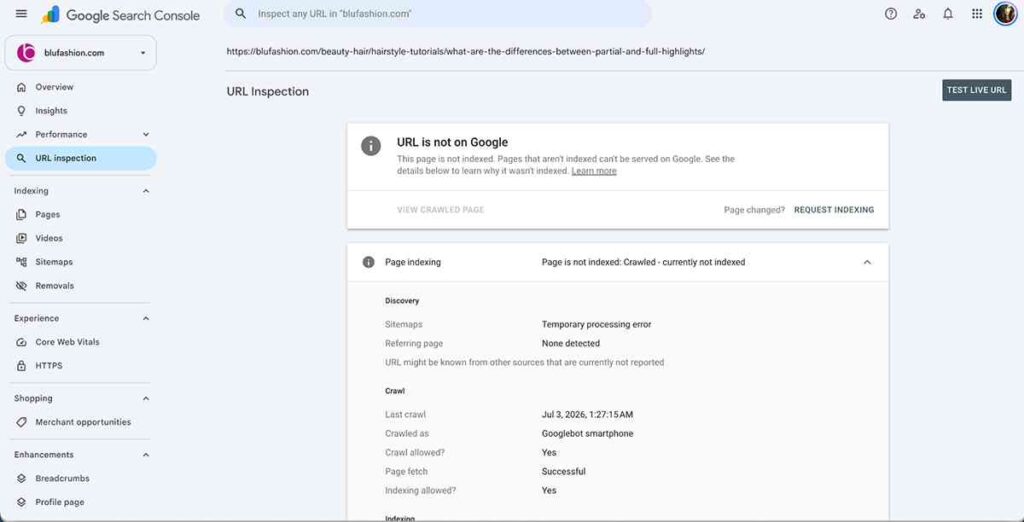
That was especially frustrating because I’d made newer changes, but Search Console continued to show the old crawl date.
The second article was Birthday Flower Delivery: Choose a Bouquet That Arrives on Time.
This page had a different status:
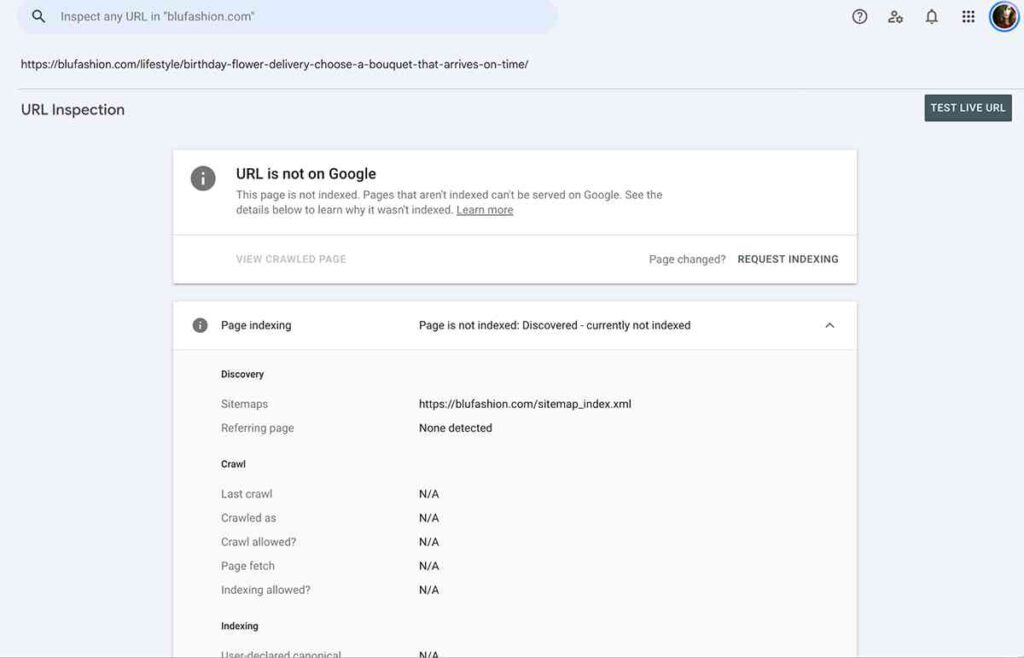
Discovered, currently not indexed.
Its last crawl field said N/A.
In other words, Google knew the birthday flower URL existed, but Search Console had no normal indexing crawl recorded for it.
These aren’t quite the same problem. The highlights page had been crawled before. The flower delivery article was known to Google but hadn’t been processed through a recorded regular crawl.
That distinction became important later.
Test One: Could Google Actually Access the Pages?
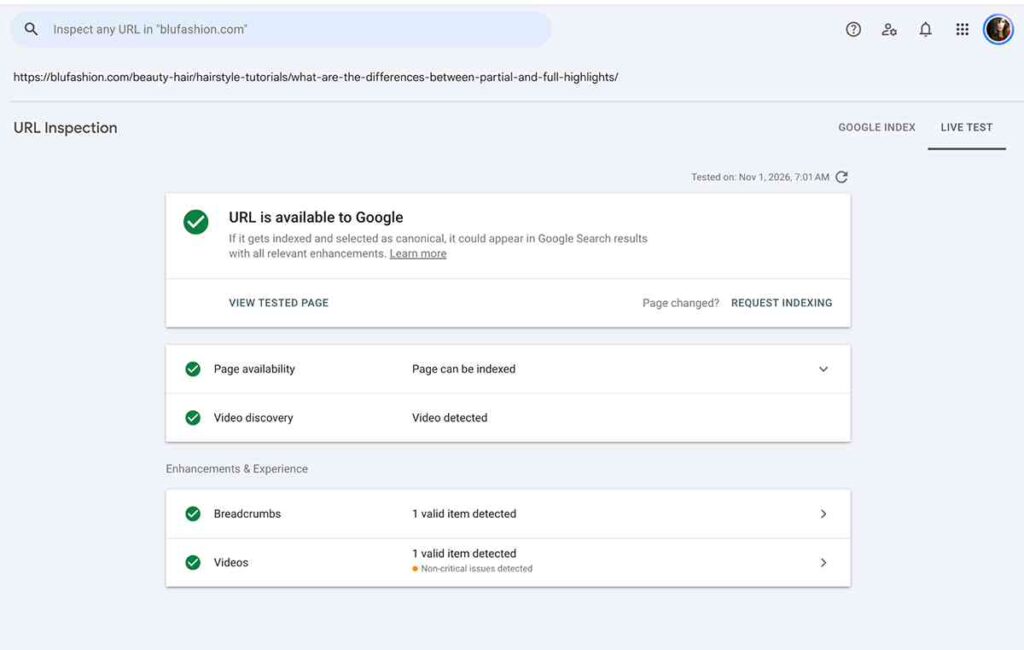
I started with Google Search Console’s URL Inspection tool.
For the highlights article, the results showed that crawling was allowed, indexing was allowed, the page fetch had succeeded, and the canonical matched my original URL.
The live test could also retrieve the updated page.
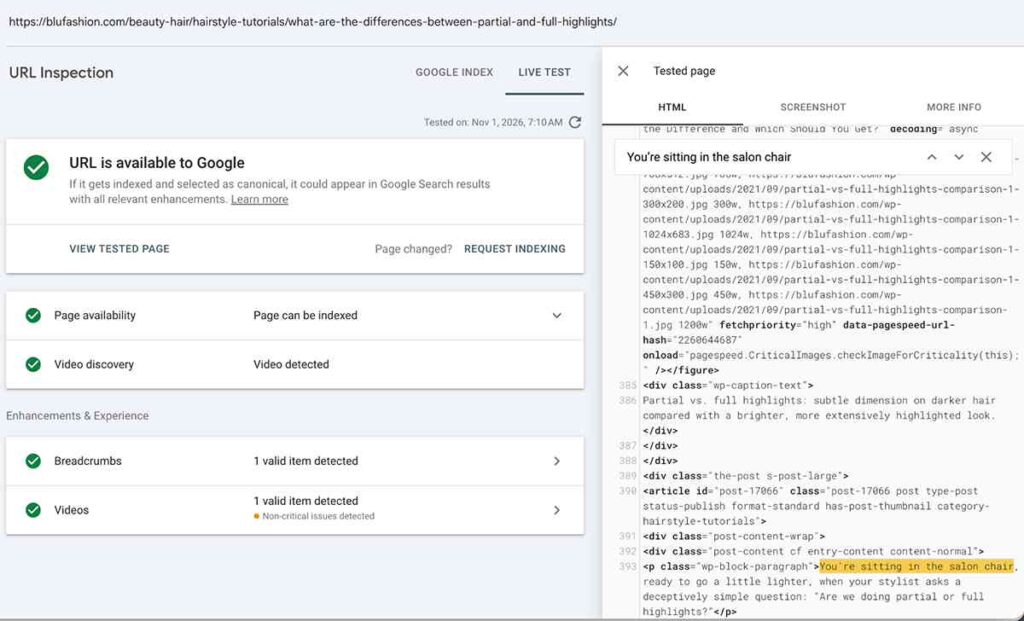
The flower delivery article passed its live test too.
On November 1, 2026, Search Console displayed the reassuring message:
URL is available to Google.
It also said the page could be indexed and detected valid breadcrumb structured data.
At first glance, that sounds like everything is fine.
But I discovered an important limitation.
A successful live test only establishes that Google can access and evaluate the page’s technical eligibility at that moment. It does not mean Google has placed the page in its normal crawl schedule, processed it for indexing, or decided to include it in search results.
Google’s own URL Inspection documentation makes this distinction clear. A successful live test confirms that Google can access and examine the page, but it doesn’t guarantee the page will be indexed.
That’s exactly what happened with my Highlights article. Google could retrieve the updated content, yet the page remained outside the index.
That meant my screenshots weren’t contradictory after all. Both live tests passed, while the normal index reports still showed the pages excluded.
Test Two: Was Google Ignoring My Sitemap?
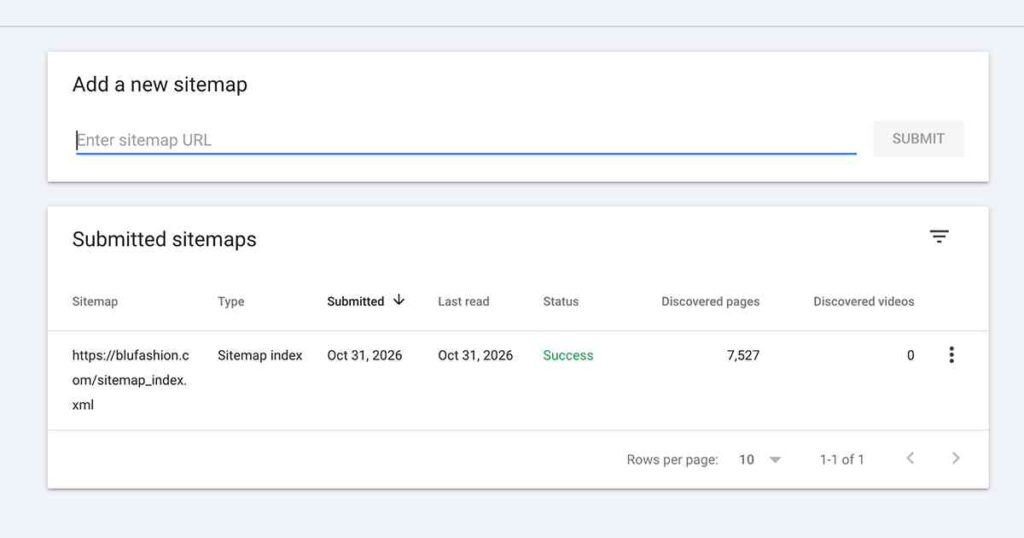
Next, I checked whether the articles appeared in BluFashion’s XML sitemap.
They did.
I also confirmed the modification dates:
| Article | Sitemap last-modified date |
|---|---|
| Partial vs. Full Highlights | October 30, 2026 |
| Birthday Flower Delivery | October 20, 2026 |
| Quiff Haircut, an indexed comparison article | October 24, 2026 |
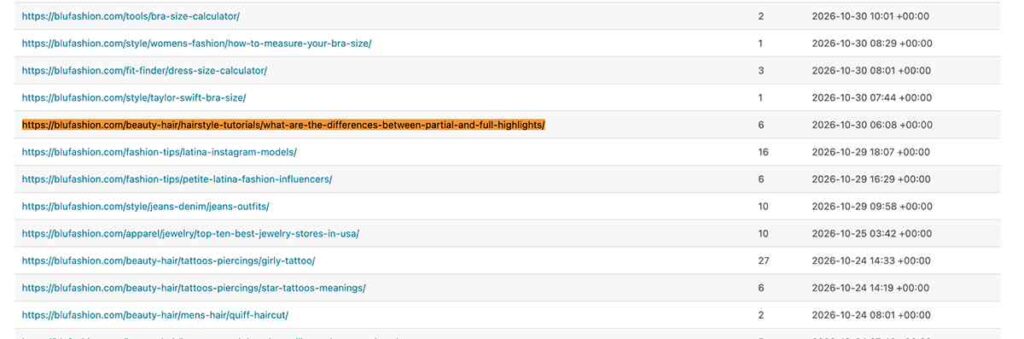
The URLs used the correct hostname and appeared in the site’s published sitemap.
There was no obvious omission to fix.
One detail looked suspicious. The Highlights URL Inspection report displayed “Temporary processing error” in the sitemap field. However, Search Console also showed that Google’s sitemap index had been read successfully, and I verified that the article’s URL appeared in the published sitemap. I couldn’t establish that the reporting error explained the missing indexing crawl.
I learned that a sitemap is a discovery signal, not an instruction Google has to follow. Even an accurate modification date doesn’t guarantee a crawl.
So I crossed missing sitemap entries off the list of explanations for these particular pages.
Test Three: Were the Articles Missing Internal Links?
Another common suggestion is to add more internal links.
Rather than blindly insert links, I examined the links already present in BluFashion’s WordPress exports.
We analyzed 7,433 published articles and looked for references to our three test URLs.
Here’s what we found in the exported article bodies:
| Article | Incoming article-body links |
|---|---|
| Partial vs. Full Highlights | 7 |
| Birthday Flower Delivery | 2 |
| Quiff Haircut | 4 |
That surprised me.
The highlights article had more incoming article-body links than the quiff article, which was already indexed.
Among the linking pages were relevant guides about balayage, summer highlights, birth-month flowers, and men’s hairstyles.
These counts didn’t include every possible navigation, homepage, category, or related-post link. We also couldn’t independently verify every link in Google’s rendered HTML.
Still, there was no basis for calling the highlights page an orphan.
Adding ten more links just to reach a larger number suddenly seemed like a poor idea.
Internal linking matters, but link quantity alone didn’t explain this case.
Test Four: What Did Cloudflare’s Logs Say?
This was where the investigation became much more interesting.
I opened Cloudflare’s HTTP request logs and searched for the exact article paths.
I filtered requests by search engine crawler and then looked for User-Agents containing Googlebot.
For the birthday flower article, the available 30-day logs returned zero matching Googlebot requests.
I repeated the process for partial vs. full highlights.
Again, zero.
But there was an important limitation. Cloudflare’s available request data could be sampled, so zero matches did not prove Googlebot had never visited. It only meant we hadn’t found a matching request in the records available to us.
Then I checked a third page.
The Quiff Haircut comparison
I’d revised and republished my Quiff Haircut guide on October 24, 2026. Google subsequently indexed it.
When I checked Cloudflare, I found Googlebot Smartphone requests dated October 24.
One request used a Googlebot User-Agent and an IP address in Google’s familiar crawler range.
This gave me an actual comparison.
| Article | Googlebot found in available 30-day logs | Index status at investigation |
|---|---|---|
| Quiff Haircut | Yes | Indexed |
| Partial vs. Full Highlights | No matching request found | Not indexed |
| Birthday Flower Delivery | No matching request found | Not indexed |
It was the first clear difference in recorded Googlebot behavior between the recovered article and the two unresolved ones.
It still didn’t prove why Google chose to revisit Quiff. But it made one thing harder to ignore: Google wasn’t treating every updated BluFashion article the same way.
Was another search engine crawling the birthday flower article?
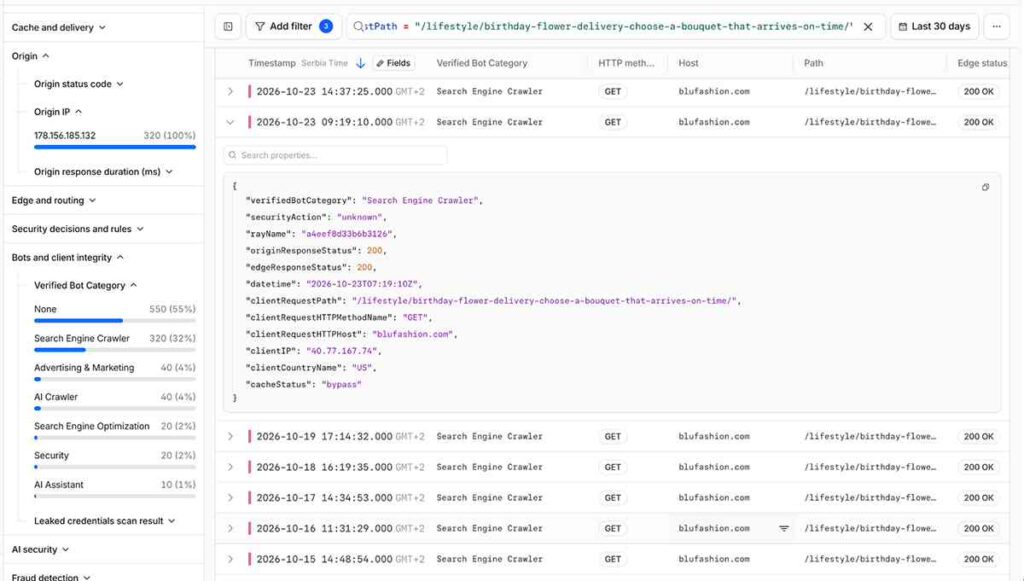
Yes.
Cloudflare showed several successful requests to Birthday Flower Delivery with HTTP 200 responses.
When I expanded one of them, its User-Agent identified it as bingbot/2.0.
So Bing was fetching the page successfully while I couldn’t find comparable ordinary Googlebot requests in the sampled logs.
That was useful evidence against a general server-access problem.
It wasn’t proof that Google had rejected the content. The logs showed different crawler behavior, not Google’s internal reason for choosing whether to crawl.
A Detour Into Thousands of Image 404 Errors
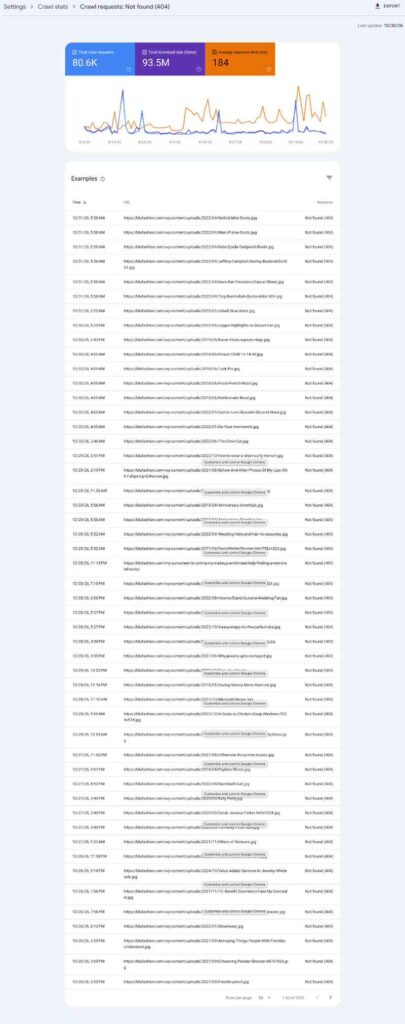
During the investigation, I noticed another suspicious number in Google Search Console.
Around 48% of the site’s recorded crawl requests over a three-month reporting period had returned 404.
That looked alarming.
A sample of 1,000 failed requests was overwhelmingly made up of old WordPress image URLs under /wp-content/uploads/.
BluFashion had previously migrated its media library to Cloudflare R2, using media.blufashion.com.
I wondered whether the old image errors were interfering with Googlebot’s attention to my articles.
So I picked one real example:
https://blufashion.com/wp-content/uploads/2022/05/buying-clothes-online-cheap.jpg
That old address returned 404.
The migrated image at:
https://media.blufashion.com/2022/05/buying-clothes-online-cheap.jpg
loaded correctly.
What made this interesting was that the original shopping advice article displayed its images normally.
How could the source image URL be broken while the image still appeared?
Looking inside the actual HTML
I opened View Page Source and found that the same image appeared in two different lazy-loading attributes.
The data-src attribute contained the old WordPress URL.
The data-srcset attribute included the working Cloudflare media URL.
Perfmatters lazy loading was active, so I tested the article again with its optimizations disabled using the plugin’s troubleshooting parameter.
The old URL was still present in the image’s regular src attribute.
I also confirmed that Perfmatters CDN rewriting was switched off.
This suggested an inconsistency in how the WordPress media addresses were stored or rewritten. It did not establish which component was responsible.
Checking what the browser actually downloaded
Then I opened Chrome Developer Tools, selected Network, and filtered for the image filename.
At first, nothing appeared. The image hadn’t yet triggered a matching request during that capture.
After allowing the lazy-loaded image to load, Chrome showed the actual request.
The result was clear:
- Request URL:
https://media.blufashion.com/2022/05/buying-clothes-online-cheap.jpg - HTTP status: 200 OK
- Content type:
image/jpeg - Cloudflare cache: HIT
- Initiator: Perfmatters lazy-loading script
So the browser was successfully downloading the correct R2 image.
We had found a real inconsistency in the HTML fallback address. But in our browser test, that particular image loaded successfully from Cloudflare R2.
That distinction mattered.
I didn’t need to move my entire media library back to WordPress, disable lazy loading, or create an untested wildcard redirect.
The URL mismatch deserves a targeted fix, ideally through the media integration or its developer. But I couldn’t honestly blame it for Google’s refusal to crawl two articles.
Nor could I treat ordinary 404 responses from old image addresses as proof that Google’s crawl budget was being exhausted.
The Most Encouraging Discovery: Some Revised Articles Were Getting Indexed
While those two pages were stuck, other older BluFashion articles were recovering.
The Quiff Haircut was one of them.
I compared its old version with the revised version.
The old article contained roughly 656 words and mostly explained what a quiff was, with a few variations and basic styling advice.
The new version had approximately 3,051 words, but that wasn’t what interested me.
The real difference was usefulness.
It helped readers compare quiffs and pompadours, choose a haircut for their face shape and hair type, explain the desired result to a barber, style their hair at home, and maintain the look.
The article had become more practical.
Importantly, other articles I’d revised also became indexed even when the newer versions were shorter than the originals.
I don’t believe length was the deciding factor.
My working approach has been to improve articles where they actually need improvement, republish them, and request indexing.
Many of the revised articles have subsequently returned to Google’s index.
That doesn’t prove whether the editorial changes or the renewed crawl requests caused the recoveries. But it is a real pattern worth testing and tracking.
It also makes the highlights article especially frustrating.
I’ve already revised that guide, improved its usefulness, confirmed its sitemap entry, checked internal links, and verified that Google can access it.
Yet its recorded indexing crawl remains July 3, 2026.
At some point, rewriting the same article again stops looking like a sensible experiment.
What We Actually Proved, and What We Didn’t
After several hours, these were the conclusions I felt comfortable making.
| Question | What our tests showed |
|---|---|
| Are both pages technically accessible to Google’s live test? | Yes |
| Are they in the XML sitemap? | Yes |
| Do they have incoming internal links? | Yes, in the WordPress article exports |
| Are their canonical and indexing directives obviously wrong? | No such issue was found in the tested highlights page |
| Did Cloudflare show normal Googlebot visits to the two problem pages in the available 30-day sample? | No |
| Did Cloudflare show Googlebot visits to the recovered Quiff guide? | Yes |
| Is the old image URL issue real? | Yes, the HTML contains a stale fallback address |
| Do the tested images load correctly in Chrome? | Yes, from Cloudflare R2 |
| Did we find Google’s exact reason for excluding either article? | No |
The most important lesson was that a green live-test result answers a technical question, not an editorial or indexing decision.
I could show that Google could fetch the page. I couldn’t make Google choose to crawl it as part of normal indexing.
What I’m Doing Differently Now
I’m not going to stop improving older articles. Several have returned to Google’s index after meaningful revisions, and that is encouraging.
But I’m changing how I approach the stubborn ones.
First, I’m separating pages Google has discovered but never crawled from pages it crawled before but hasn’t revisited. They shouldn’t be treated as identical problems.
Second, I’m preserving articles that are already useful instead of rewriting them repeatedly just to change their modification dates.
Third, I’m recording both indexing outcomes and actual crawler activity wherever possible. A successful indexing request submission doesn’t count as a successful crawl, and a successful crawl doesn’t guarantee indexing.
Finally, I’m treating technical issues according to the evidence. A broken image fallback is worth correcting. That doesn’t automatically make it the reason an HTML page isn’t indexed.
Google says its crawl demand depends on factors including site size, update frequency, page quality, relevance, and popularity. It also says that technically eligible pages aren’t guaranteed inclusion in Search.
That explanation fits the general pattern we observed, but it doesn’t reveal why either of my two URLs was passed over.
And that uncertainty deserves to stay in the story.
So Why Won’t Google Index These Articles?
After everything we tested, I can’t name a single confirmed cause.
The two pages are discoverable. The live tests succeed. The sitemap entries are present. At least some internal links exist. Yet Google hasn’t recorded the normal crawling activity needed to evaluate their latest versions for indexing.
My strongest remaining hypothesis is that Google is assigning these URLs lower crawl priority than other updated BluFashion pages.
It’s a hypothesis, not a verdict.
For now, I’m leaving the highlights and birthday flower articles intact, keeping their original URLs, and watching for an ordinary Googlebot visit rather than repeatedly changing content that may already be good enough.
I’m continuing to improve other older articles where I can identify real gaps in accuracy, clarity, relevance, or usefulness.
What I won’t do is claim that adding another 500 words, changing a URL, fixing an unrelated image, or pressing Request Indexing one more time is a guaranteed solution.
The most surprising part of this investigation wasn’t that Google refused to index two pages. It was how many things could be working correctly while the pages still remained outside the index.
If you’re dealing with the same problem, I hope this gives you a more useful starting point than another generic indexing checklist.
Check what Google actually recorded. Look at your crawler logs if you have them. Test your assumptions. And don’t mistake an explanation that sounds plausible for one you’ve actually proved.