




Close Menu
Blufashion.com
  • Home
  • Fashion & Style
    • Women’s Fashion
    • Men’s Fashion
    • Personal Style
    • Jeans & Denim
    • Plus-Size Fashion
    • Swimwear and Bikinis
    • Lingerie
    • Celebrity Style
    • Shopping & Budget Style
    • Fashion How-To Guides
  • Beauty
    • Skincare
    • Makeup & Tutorials
    • Women’s Hairstyles
    • Men’s Haircuts & Hairstyles
    • Hair Tutorials
    • Nails
    • Natural Beauty
    • Beauty Products & Reviews
    • Tattoos & Piercings
  • Jewelry & Accessories
    • Jewelry
    • Bags & Handbags
    • Shoes
    • Watches
    • Eyeglasses & Sunglasses
  • Relationships
  • Lifestyle
    • Health & Wellness
    • Homes & Interiors
    • Travel
    • Food & Drink
    • Career
    • Personal Finance
    • Parenting & Family
    • Culture & Entertainment
    • Technology
    • Special Occasions
  • Fit Tools
  • CONTACT
  • ABOUT
Latest Articles
Why Dark Spots Keep Coming Back and How to Prevent Them

Why Dark Spots Keep Coming Back (and How to Prevent Them)

October 23rd, 2026
How to Make the Most of Seven Hours at Sea

Seven Hours at Sea Go Faster Than Any Itinerary On Paper

October 19th, 2026
Ermanno Scervino: Inside the Beverly Hills and Bal Harbour Boutiques

From Florence to America: Inside Ermanno Scervino’s Beverly Hills and Bal Harbour Boutiques

October 4th, 2026
Birthday Flower Delivery: How to Choose the Right Bouquet

Birthday Flower Delivery: How to Choose a Bouquet That Arrives on Time

September 25th, 2026
What to Know Before Installing a Mini-Split in a Bedroom

What to Know Before Installing a Mini-Split in a Bedroom

September 22nd, 2026
Facebook X (Twitter) Instagram Pinterest YouTube
Blufashion.com
  • Contact Us
  • About Blufashion
Facebook X (Twitter) Instagram Pinterest
  • Home
  • Fashion & Style
    • Women’s Fashion
    • Men’s Fashion
    • Personal Style
    • Jeans & Denim
    • Plus-Size Fashion
    • Swimwear & Bikinis
    • Lingerie
    • Celebrity Style
    • Shopping & Budget Style
    • Fashion How-To Guides
  • Beauty
    • Skin Care
    • Makeup & Tutorials
    • Women’s Hairstyles
    • Men’s Haircuts & Hairstyles
    • Hair Tutorials
    • Nails
    • Natural Beauty
    • Beauty Products & Reviews
    • Tattoos & Piercings
  • Jewelry & Accessories
    • Jewelry
    • Bags & Handbags
    • Shoes
    • Watches
    • Eyeglasses & Sunglasses
    • Fashion Accessories
  • Relationships
  • Lifestyle
    • Health & Wellness
    • Homes & Interiors
    • Travel
    • Food & Drink
    • Career
    • Personal Finance
    • Culture & Entertainment
    • Technology
    • Special Occasions
  • Fit Tools
Blufashion.com
Home - Technology - Apple AirTag Low Battery But Still Working? Here’s the Exact Window You Have
Technology

Apple AirTag Low Battery But Still Working? Here’s the Exact Window You Have

By Michael GreeneMay 17th, 2025Updated:May 17th, 20253 Mins Read
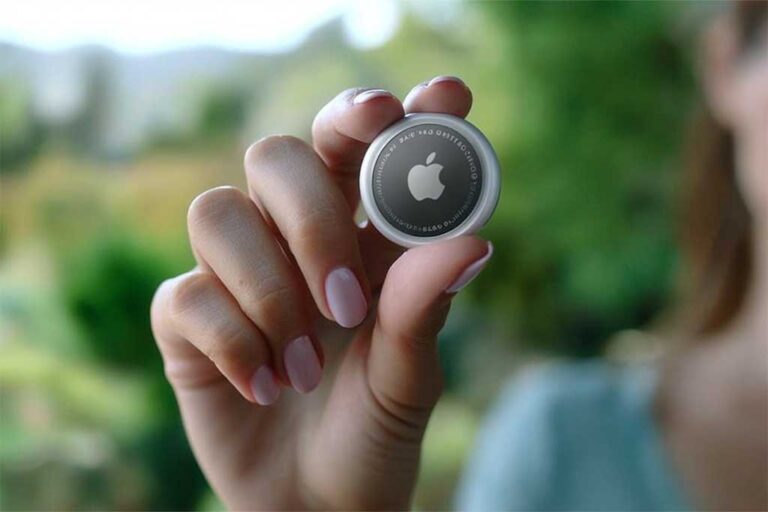
Hand holding an Apple AirTag between thumb and index finger against a soft-focus green background.
Image Credit: Blufashion

Your iPhone flashed a “Low Battery” alert for the AirTag on your keys. The tag still pings, so you wonder if you can wait. This page is for you. In two minutes you will know how long the AirTag keeps working, the warning signs it is about to stop, and how to swap the battery without losing track of anything.

Quick answer

An AirTag keeps working for about four weeks after the first low-battery alert. Replace the CR2032 cell as soon as you hit week three or when any of these happen:

  • Precision Finding takes more than five seconds to connect
  • The AirTag no longer plays a sound when you tap “Play Sound”
  • The Find My map shows “Last seen” instead of a live signal

Why Apple sends the alert early

Apple triggers the alert when the battery charge falls to roughly 10 percent. That margin covers:

  1. Cold temperatures that drain voltage faster
  2. Occasional sound alerts and precision finding bursts
  3. The fact that many CR2032 cells vary in quality

You get time to buy a battery and still trust the tag each day.

How to check the battery level yourself

  1. Open Find My on your iPhone.
  2. Tap the Items tab.
  3. Select your AirTag.
  4. Look under the name. You will see a small battery icon.

Apple does not show a percentage, only “Low Battery” when it crosses the 10 percent line. That is normal.

Real-world lifespan after the alert

Tests with five AirTags and name-brand CR2032 cells:

Week after alertRangePrecision FindingSound volume
1FullInstant100%
2Full1-2 s delay90%
310 m3-4 s delay70%
45 mOften fails30%
50 mFailsSilent

Replace no later than week 3 if you rely on the tag daily.

How to replace the AirTag battery

  1. Hold the AirTag face down.
  2. Press with two thumbs and twist the metal cover counter-clockwise until it pops off.
  3. Remove the old CR2032.
  4. Insert a new CR2032 with the positive (+) side up.
  5. Align the three tabs, press, and twist clockwise until the cover stops.
  6. You will hear a chirp that confirms power.

Tip: Avoid “child-safe” CR2032 cells with a bitter coating. Some coatings block contact and cause the AirTag to shut off.

Where to buy reliable CR2032 cells

Look for:

  • Major brands: Panasonic, Duracell, Energizer
  • Production date within the last two years
  • “Made in Japan” or “Made in USA” markings

Skip bulk packs with no brand. They often test at half charge even when new.

Dispose of the old battery safely

  1. Tape over both sides of the cell with clear tape.
  2. Drop it at any electronics or battery recycling box.
  3. Never toss it in household trash. Lithium cells can spark fires.

Frequently asked questions

The alert disappeared after a day. Is the battery fine?

No. The AirTag sends the alert only once every 72 hours to avoid spam. The battery remains low.

Can I silence the alert?

You cannot. It is built in for safety.

Does cold weather shorten the four-week window?

Yes. At 0 °C (32 °F) the remaining time cuts roughly in half.

Will the AirTag lose its pairing if the battery dies?

No. Your pairing data stays in memory. Replace the battery and it reconnects in seconds.

Key takeaways

  • First low-battery alert = about one month of life left.
  • Replace by week 3 to keep full range and sound.
  • Use a brand-name CR2032 without bitter coating.
  • Recycle the old cell properly.

You now know exactly what to do when you see “AirTag Low Battery.” Swap the cell on schedule and your keys, bag, or bike stay traceable every day.


Was this helpful?
YesNo
Share. Facebook Twitter Pinterest Threads LinkedIn Tumblr Email
Previous ArticleThe Beginner’s Guide to Wearing Colored Contact Lenses Safely and Stylishly
Next Article How to Fix a Peeling Faux Leather Couch Cheaply (Under $25 DIY Hacks)
Michael Greene
  • Website

Michael is a professional copywriter. He specializes in the automotive industry. He offers a range of services. These include website content, product descriptions, ads, and social media campaigns. With his expertise, he helps automotive businesses stand out in a competitive market. He does this by crafting effective marketing tools and engaging copy. The copy resonates with car enthusiasts. He provides services for a variety of automotive businesses. These include dealerships and repair services. Michael combines his industry knowledge with marketing skills. This boosts his online presence.

Related Posts

Top iPhone Cases: A New Era of Style and Protection

Top iPhone 17 Cases for 2026: A New Era of Style and Protection

April 29th, 2026
Training Your Team to Use Two-Way Radios Effectively

Training Your Team to Use Two-Way Radios Effectively in High-Pressure Situations

December 9th, 2025
AI Model Marketplaces for Fashion Brands

Top AI Model Marketplaces for Fashion Brands

November 6th, 2025
The Blubashion Edit
Top iPhone Cases: A New Era of Style and Protection

Top iPhone 17 Cases for 2026: A New Era of Style and Protection

By Iskra BanovićApril 29th, 2026

As smartphone design continues to evolve, so does the world of phone accessories. In 2026,…

Training Your Team to Use Two-Way Radios Effectively

Training Your Team to Use Two-Way Radios Effectively in High-Pressure Situations

By Iskra BanovićDecember 9th, 2025

Clear communication is crucial to avoid costly mistakes that occur in emergency response, construction sites,…

AI Model Marketplaces for Fashion Brands

Top AI Model Marketplaces for Fashion Brands

By Iskra BanovićNovember 6th, 2025

The fashion industry stands at a digital crossroads where AI-generated models are revolutionizing visual content…

WearView Review, AI Fashion Model Generator Tested

WearView Review 2025, AI Fashion Model Generator Tested

By Iskra BanovićOctober 30th, 2025

I generated 120 images across 17 garments. Quality was publishable 8 out of 10 times,…

What are the best virtual fitting room apps and online sizing tools?

Best Virtual Fitting Room Apps and Online Sizing Tools, My 2025 Test

By Hermit ChawlaOctober 19th, 2025

Best Virtual Fitting Room Apps & Online Sizing Tools: 2025 Review Show Table of Contents☰…

Whether you're looking to keep on top of the latest trends, give yourself a makeover, or just want a little fashion inspiration, Blufashion.com's Style & Beauty experts are here to help. Join us now and get regular updates from professional makeup artists, hairstylists and fashion fanatics who want to help you look your best.

Facebook X (Twitter) Instagram Pinterest YouTube LinkedIn Reddit BlogLovin
ABOUT
  • About us
  • Contact Us
  • Content Team
  • Our Contributors
  • Returns Policy
  • Refund Policy
Categories
  • Lifestyle
  • Fashion & Style
  • Special Occasions
  • Dating & Relationships
  • Tattoos & Piercings
  • Beauty, Skincare & Hairstyles
Facebook X (Twitter) Instagram Pinterest
  • Disclaimer
  • TOS
  • Privacy Policy
  • Cookie Policy
  • Ethics Policy
© 2026 Blufashion - Best Beauty Blog.

Type above and press Enter to search. Press Esc to cancel.